
Nightwater
Snore clips. Sleep talk. A gentler alarm.
Hear the parts of the night you slept through. Nightwater saves snoring and sleep-talk clips on your iPhone, ready to replay in the morning. Wake with your iPhone alarm or a tap on your wrist.
For iPhone and Apple Watch. Free to download, with an optional one-time Pro upgrade.
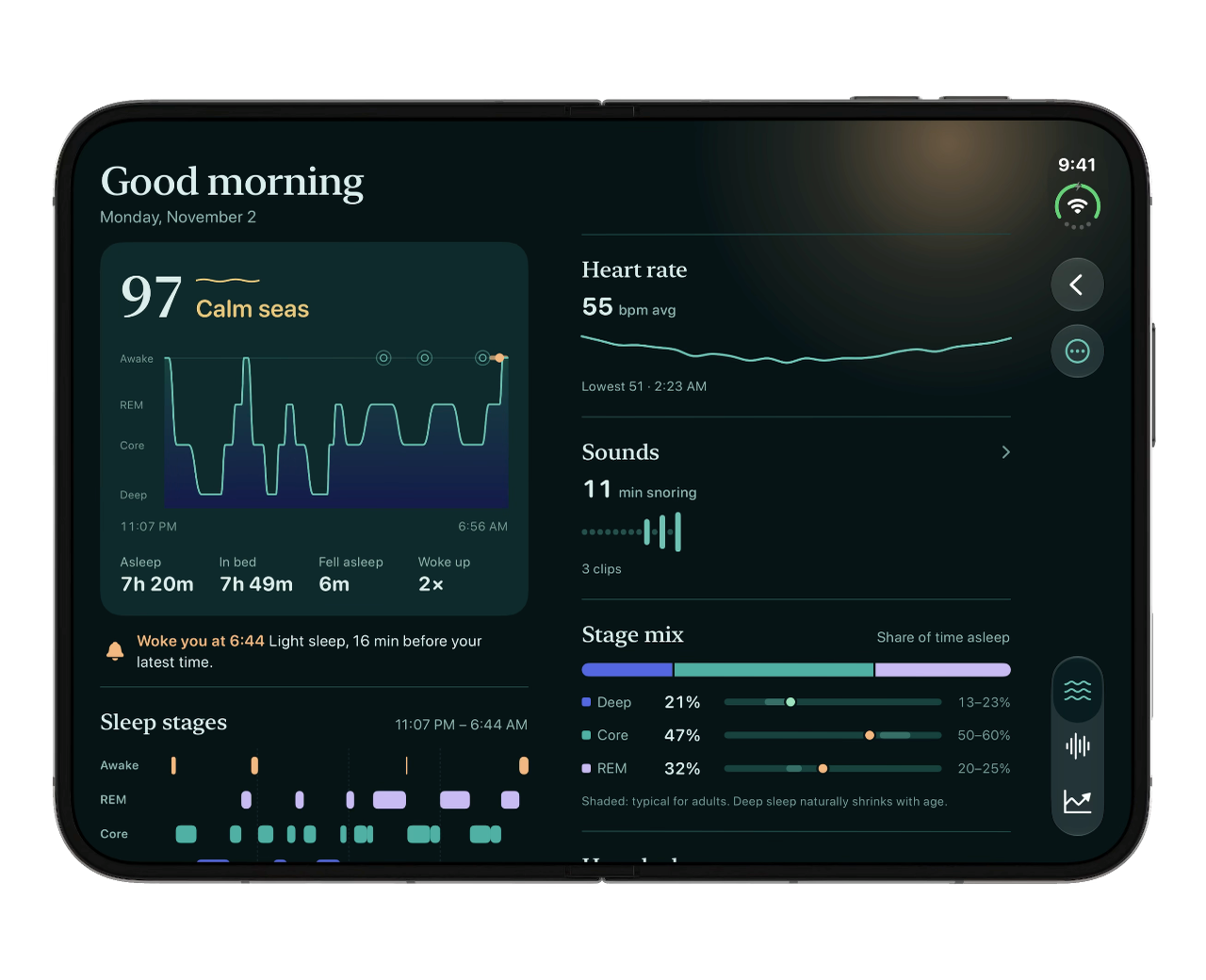
Hear your night. Wake on your terms.
Snore clips worth finding
Replay the sounds Nightwater detected on a timeline of your night. Loudness bars help you find the louder moments and jump straight to them.
The things you say in your sleep
Sleep-talk clips sit alongside your snores. Sound analysis happens on your iPhone; only snoring and sleep-talk clips are kept, for 30 days.
A tap on your wrist, with a backup
Choose Watch only for wrist taps. Your iPhone rings 10 minutes later only if you haven’t stopped or snoozed on the Watch. Or choose Watch first or an iPhone sound alarm.
An alarm for nights you start
Set your latest wake time and a smart wake window, then tap Start Sleep. With an armed Apple Watch, Nightwater looks for you stirring inside that window; otherwise it wakes you at your latest time.
The rest of the night, in context
Apple Watch sleep stages, the depth chart and longer-term trends help you explore the night alongside its sounds.
Curious before your first night? Tap “See a sample morning” on Tonight. It opens a clearly labelled sample report, Sounds and Trends.
Your night, in sound clips
Open Sounds in the morning to hear snoring and sleep talk. Choose a clip from the timeline, replay it, or jump to its loudest moment. Loudness figures are estimates.
Leave your iPhone unlocked with Nightwater open on the Sleeping screen, near your pillow and with its microphone uncovered. Sound recording works without an Apple Watch.
A nearby person’s voice may appear in a clip. Your recordings stay on your iPhone and are kept for 30 days.
Try recording for seven saved nights. A one-time Nightwater Pro purchase unlocks unlimited recording; playback of existing clips and alarms stay free.
How to set up your iPhone for recording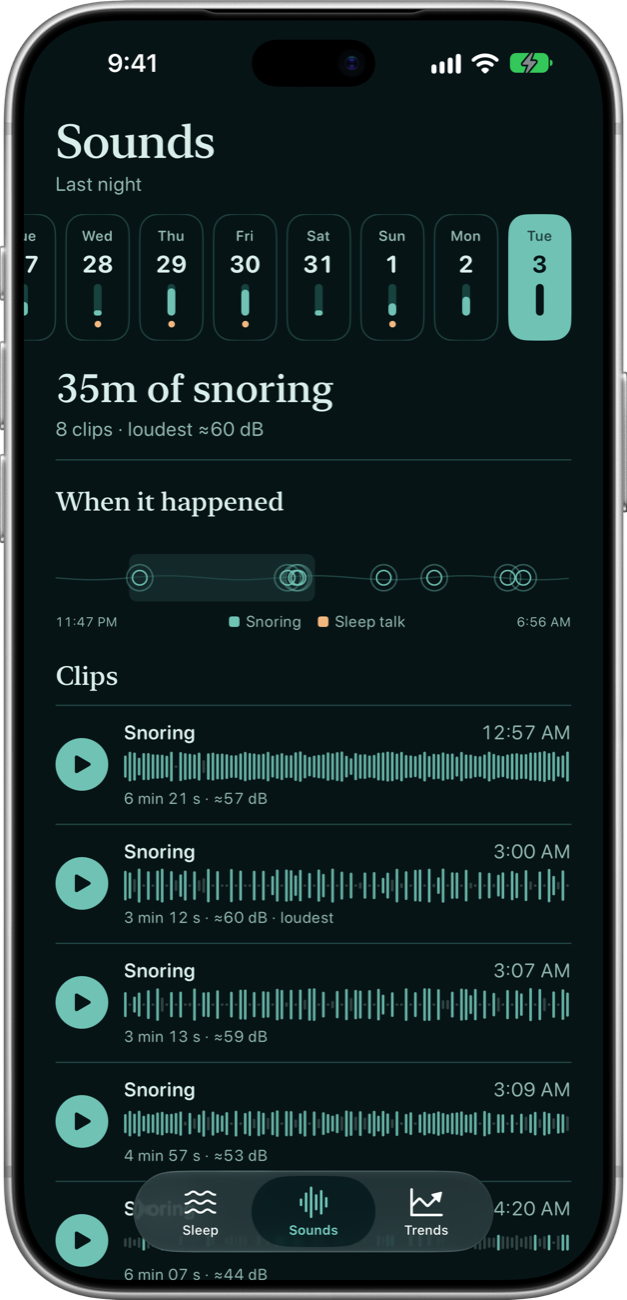
1Tonight: set the alarm, tap Start Sleep
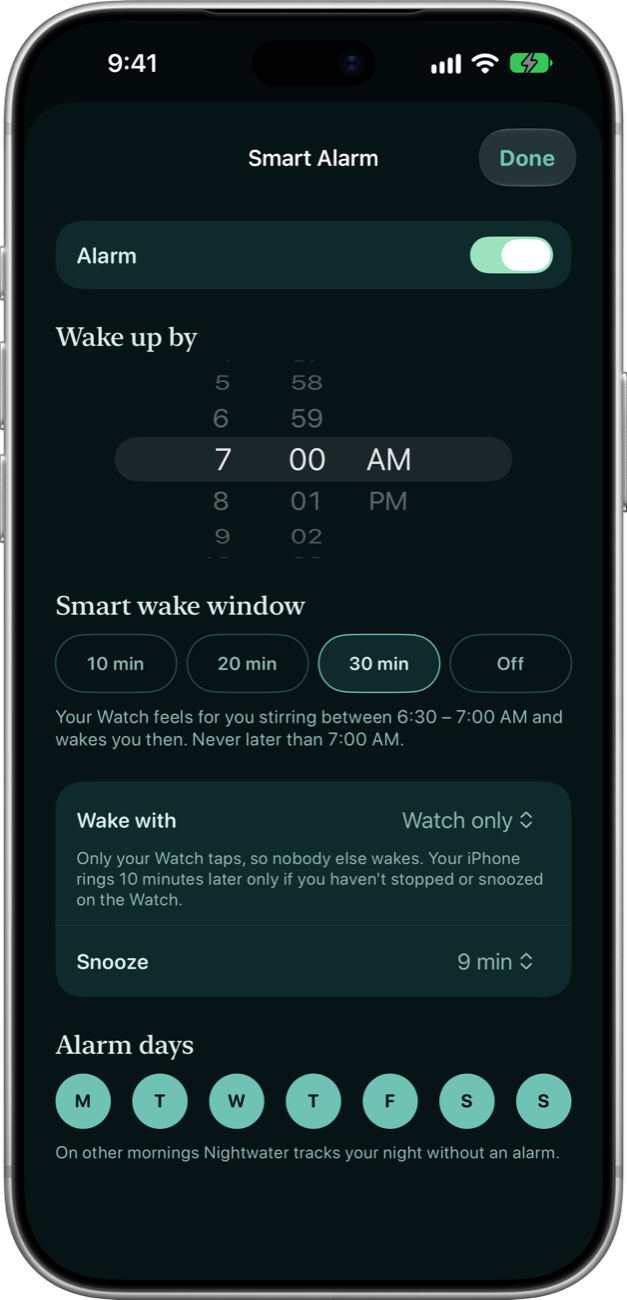
On the Tonight screen, tap the wake-up time to open Smart Alarm.
- Wake up by
- The latest time you can get up.
- Smart wake window
- 10, 20 or 30 minutes before it, when your Watch may wake you a little early. Choose Off to ring at exactly that time.
- Wake with
- Watch only: just your wrist. Your iPhone rings 10 minutes later only if you haven’t stopped or snoozed on the Watch.
- Watch first: your wrist taps, and your iPhone rings 30 seconds later unless you stop or snooze on the Watch. At your latest time, both go off together.
- Sound: your iPhone rings.
- Alarm days
- The mornings it rings. On other mornings Nightwater tracks your night without an alarm.
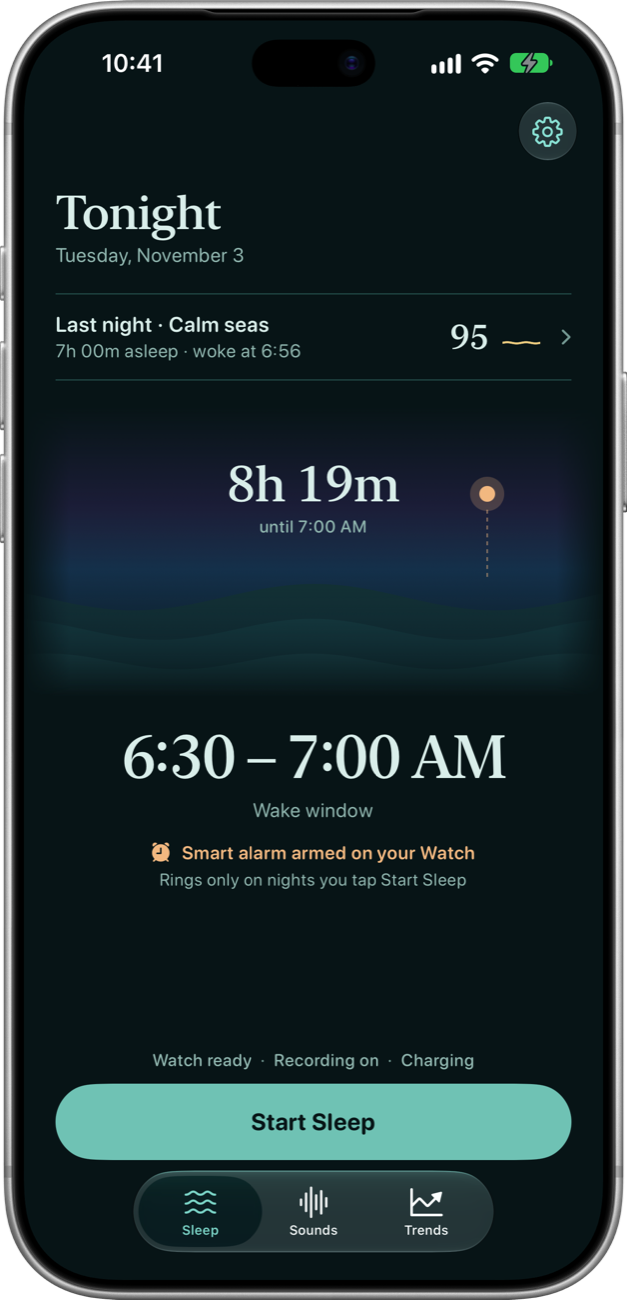
At bedtime, tap Start Sleep, or say “Start sleep in Nightwater”. Once you allow Nightwater to set alarms, the alarm rings in silent mode and Focus, even with the app closed.
2Where to put your iPhone
- On the nightstand, plugged in if you can. A cable or MagSafe charger both work. Keep it within arm’s reach of your pillow.
- Face up or face down, with the microphone at the bottom uncovered.
- Leave it unlocked, with Nightwater open on the Sleeping screen. It listens for snoring and sleep talking, on the device. The screen goes almost black, and fully dark face down.
- Don’t swipe Nightwater away in the app switcher. Closing it stops the microphone, though your alarm still rings.
Nightwater doesn’t record in Low Power Mode, or when the battery is under 20% and not charging.
3Wear your Apple Watch
- Wear it to bed, charged, with sleep tracking turned on. Your sleep stages and heart rate come from Apple Watch’s own sleep tracking, through Apple Health.
- Open Nightwater on your Watch once before bed so it can arm the smart alarm. Tonight on your iPhone then says “Smart alarm armed on your Watch”.
- You can also tap Start Sleep on the Watch.
The smart alarm needs Nightwater on an Apple Watch with watchOS 11 or later. Without a Watch, Nightwater still records snoring and sleep talk and rings your alarm at your latest time; sleep stages, heart rate and the sleep score with its depth chart need the Watch.
4Waking up
- The alarm comes when you stir. Inside your window, your Apple Watch feels for a burst of movement or a rising heart rate and wakes you then. With no sign, it wakes you at your latest time.
- Your iPhone is the backup. With Watch first it rings 30 seconds after the tap; with Watch only, 10 minutes later. Either way, stopping or snoozing on the Watch keeps it quiet.
- Stop or snooze from the alarm itself, even with Nightwater closed.
- Then tap I’m awake · End night on the Sleeping screen, “I’m awake” on the Watch, or say “I’m awake in Nightwater”. Ending on either device ends the night on both.
A night shorter than 20 minutes isn’t saved.
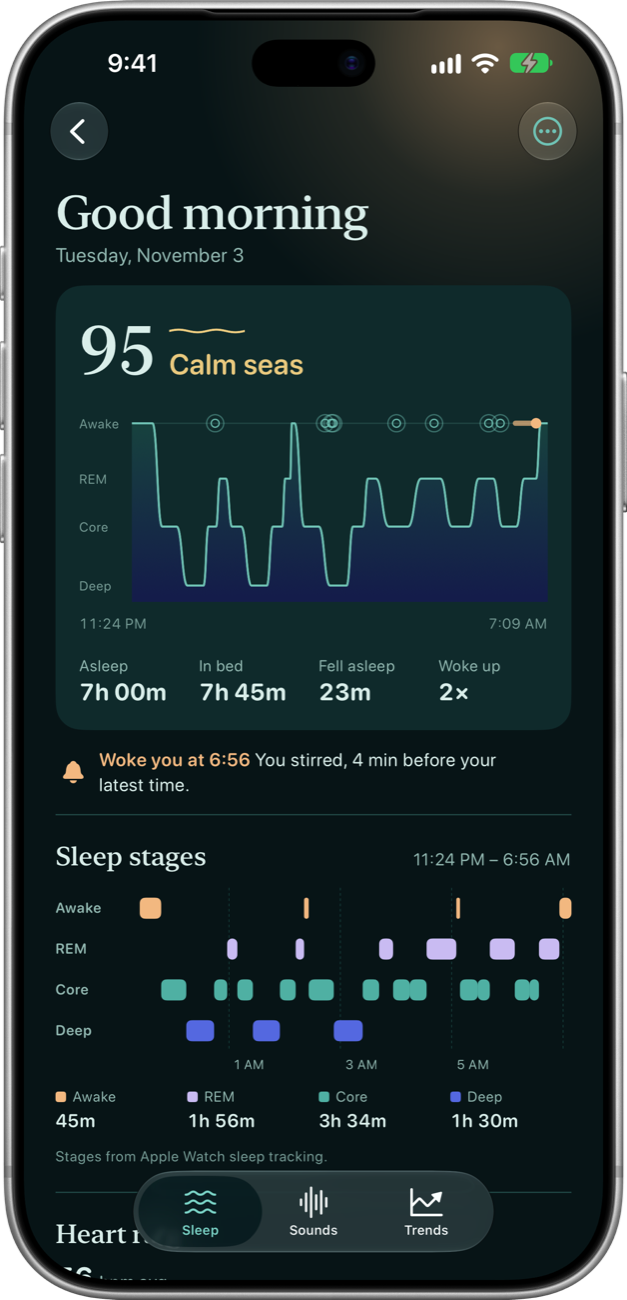
5Your morning report
The depth chart. Deep sleep lies deepest and being awake sits at the surface, with snores as ripples on top and a mark where you woke. The stages are Apple Watch’s, and arrive once the Watch has synced to Apple Health, usually a few minutes after you wake.
The sea state. Your score, out of 100, comes from your time asleep, time asleep as a share of time in bed, deep and REM sleep, and awakenings.
- Calm seas
- 85 and up
- Gentle swell
- 70 to 84
- Choppy water
- 55 to 69
- Rough seas
- under 55
Your sounds in context. Open Sounds alongside the report to replay the snore and sleep-talk clips from that night.
Loudness figures are estimates. After five nights with Apple Watch stages, Nightwater adds a plain-language observation from your last 30 days when one stands out.
6Trends
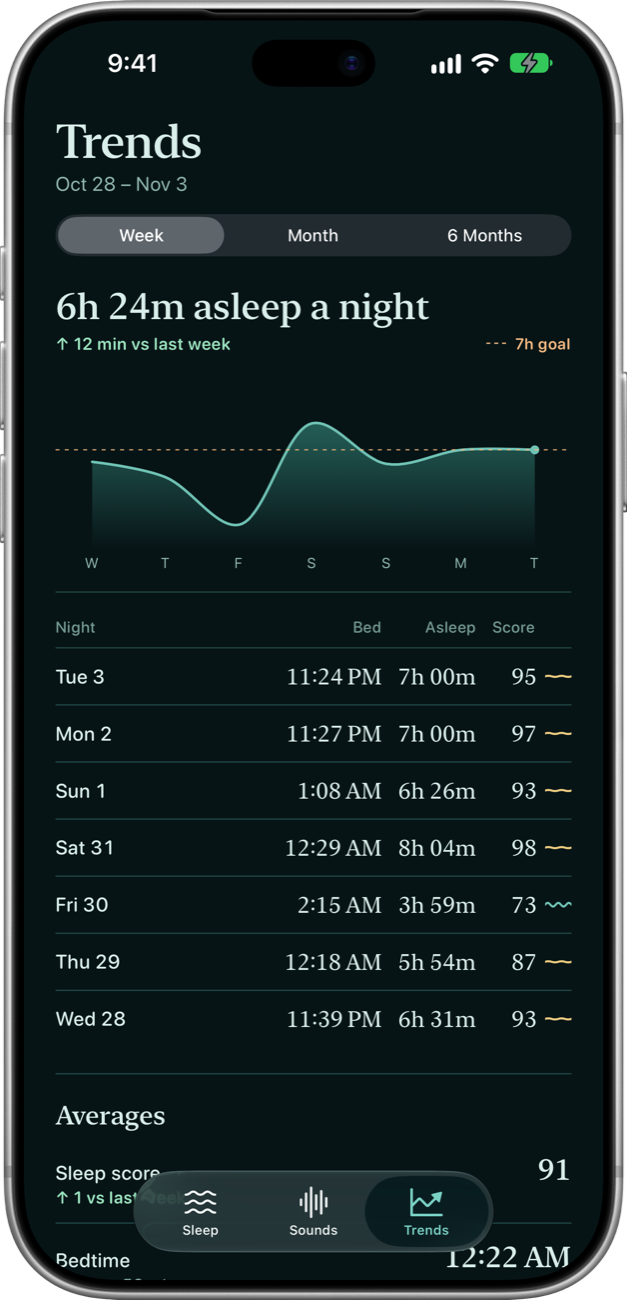
Your sleep over a week, a month or six months: time asleep against a 7-hour goal, a row for each night, week or month, and your averages.
7Nightwater Pro
Sound recording is free for your first seven saved nights. A one-time Nightwater Pro purchase then unlocks unlimited recording and iCloud alarm-settings sync.
Alarms, reports and playback of saved clips stay free.
8What stays private
- No account. No ads. Sleep data stays on your devices. RevenueCat handles purchase services and purchase analytics.
- Health stays in Health. Nightwater reads from Apple Health and never writes to it, and it never uploads your Health data.
- Recordings stay on your iPhone. Only snoring and sleep-talk clips are kept; everything else is discarded as it’s heard. If a partner talks in the night, their voice can end up in a clip. Nightwater keeps clips for 30 days and marks them for exclusion from device backups.
- Only your alarm settings go to iCloud, your own, to reach your other iPhones. Your Apple Watch gets your alarm and last night’s summary straight from your iPhone.
What you need
An iPhone with iOS 26 or later. Sleep stages, heart rate, and the sleep score with its depth chart need an Apple Watch with sleep tracking turned on; the smart alarm needs Nightwater on an Apple Watch with watchOS 11 or later.
Nightwater is for general wellness and isn’t a medical device. It doesn’t diagnose sleep disorders such as sleep apnea.
Questions?
Something not working, or a night that doesn’t look right? The support page has short answers, or you can email me.